android um

Tuesday, March 13, 2012
Download Official Final Release Android ICS 4.0.3 for Samsung Galaxy S 2 GT-i9100 - March 2012
Finally, the latest official releases for Android Ice Cream Sandwich 4.0.3 started to roll out today for Samsung Galaxy S II users, via Kies or FOTA (Firmware Over The Air). Be sure to use Wifi connection if you have the option to update your firmware over the air, if not just use Samsung Kies.
These are the regions that got the update, if you don't want to wait anymore, just download the firmware and use ODIN to flash it:
PDA: I9100XXLPQ - CSC: I9100OXXLPD based on 4.0.3, date 2012 March - Nordic Countries
PDA: I9100XXLPQ - CSC: I9100OXXLPD based on 4.0.3, date 2012 March - Baltic
PDA: I9100XXLPQ - CSC: I9100OXALPQ based on 4.0.3, date 2012 March - Poland
PDA: I9100XXLPQ - CSC: I9100OXXLPD based on 4.0.3, date 2012 March - Hungary
Update:
New releases from other regions:
PDA: I9100ZSLPE - Android 4.0.3 - 2012 March - CSC: I9100OZSLPE - Hong Kong / Taiwan = Link
PDA: I9100XWLP2 - Android 4.0.3 - 2012 March - CSC: I9100OXELP4 - Russia, = Link
PDA: I9100XXLPQ - Android 4.0.3 - 2012 March - CSC: I9100H3GLP2 - United Kingdom (H3G) = Link
PDA: I9100XXLPQ - Android 4.0.3 - 2012 March - CSC: I9100HTSLP3 - Sweden (Tre) = Link
PDA: I9100XXLPQ - Android 4.0.3 - 2012 March - CSC: I91003IELP2 - Ireland (Three) = Link
links courtesy of sammobile.com

Friday, March 9, 2012
Android Market = Google Play Store
The old Android Market has been finally updated, new name is Google Play, a digital entertainment destination where you can find, enjoy and share your favorite music, movies, books and apps on the web and on your Android phone or tablet.
Google Play is cloud based, so all your goodies are stored online and are always available anywhere you need them, also you can be sure that they will never get lost or deleted.
There's also a new version available of the mobile app, called Google Play Store v3.4.7 - mirror

Google Play is cloud based, so all your goodies are stored online and are always available anywhere you need them, also you can be sure that they will never get lost or deleted.
With Google Play you can:
- Store up to 20,000 songs for free and buy millions of new tracks
- Download more than 450,000 Android apps and games
- Browse the world’s largest selection of eBooks
- Rent thousands of your favorite movies, including new releases and HD titles
There's also a new version available of the mobile app, called Google Play Store v3.4.7 - mirror

Thursday, February 9, 2012
F.U.C.K. A.C.T.A. - Another tracker closed, fileporn.org
Although it hasn't been officially voted, ACTA strikes in hard the p2p sharing community, not directly, but helped by lawsuits.
After the closing of megaupload and filesonic, now the trackers start to go down one by one.
First to go is a good old quality porn tracker, http://www.fileporn.org:
"Hello fellow FilePorners
Unfortunately we have to terminate our tracker services due to a "copyright infringements" lawsuit. There isn't much we can do but comply to their terms.
It was a great privilege running this community all this time. I wanted to thank our Moderators, Uploaders (old or new) and YOU forum.
A great THANKS to all VIP members and supporters of this tracker. Your generosity was vital for this tracker to stay alive, the lack of funds has always been an issue for us.
There will be no comeback from the original FilePorn admins/mods team.
Thanks for your support, dedication and your time.
FilePorn Admin, 9/2/2012."
UPDATE:
I didn't even finished to write this post and i just saw that another porn tracker is closed, this time is http://cheggit.net
As i just said, this shit is bad...
UPDATE 2:
And another one, http://btjunkie.org, gone for good...
After the closing of megaupload and filesonic, now the trackers start to go down one by one.
First to go is a good old quality porn tracker, http://www.fileporn.org:
"Hello fellow FilePorners
Unfortunately we have to terminate our tracker services due to a "copyright infringements" lawsuit. There isn't much we can do but comply to their terms.
It was a great privilege running this community all this time. I wanted to thank our Moderators, Uploaders (old or new) and YOU forum.
A great THANKS to all VIP members and supporters of this tracker. Your generosity was vital for this tracker to stay alive, the lack of funds has always been an issue for us.
There will be no comeback from the original FilePorn admins/mods team.
Thanks for your support, dedication and your time.
FilePorn Admin, 9/2/2012."
UPDATE:
I didn't even finished to write this post and i just saw that another porn tracker is closed, this time is http://cheggit.net
As i just said, this shit is bad...
UPDATE 2:
And another one, http://btjunkie.org, gone for good...
Wednesday, January 18, 2012
MiUi - The best AOSP based experience!
I heard a lot and i've seen a lot of infos / videos of Miui, but i never took the time to install it on my phone and test it, until a few days ago when i finally decided to try it. Oh boy :) what a great decision i've made
Miui is incredible, a combination of Android and iOS with a very clean and neat user interface, only issue that bothered me at the beginning was the lack of an App Drawer, but i have found a solution for that right away, there's a mod called Extended Settings Menu, you can change a bunch of stuff, like the color of the Status Bar / Clock / Carrier, you can also swap the Battery / Signal position from right to left, center the clock, etc..., very useful, it also add an option to activate the App Drawer :) All you need to do is flash in CWM a small zip and install a apk for controlling the Mod.

And finally, maybe the most important aspect of Miui its the high level of customization and the huge community that creates some amazing themes. You can change almost every aspect of the Rom, from the status bar look to the lockscreen style, no need for 3rd party apps, Miui comes with its own Theme app that can handle .mtz files. You have also the option to browse online for themes straight from the app, an excellent features, you'll never get bored with this Rom
Here are a few great themes for Miui: Suave HD Redone, Zorsha Design, Soda HD and the new SkyDark ICS.
There are a lot of Miui version out there, be careful what you choose, not all of them are translated very good from Chinese, i recommend the Miui-Android v2.1.13 version, available for SGS2 and a few other phones.
There's also Galnet Miui, i heard a lot of good feedback for this also, but i haven't tested it yet, right now i'm using v2.1.13 from Miui-Android Team :)
That's all for now, go and flash your Miui asap, you'll be amazed by the new look of your phone, the real HD experience!
I'll leave you with some inside scoops, enjoy!
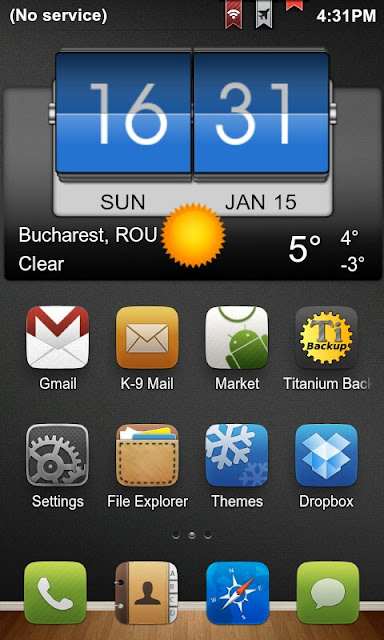


Miui is incredible, a combination of Android and iOS with a very clean and neat user interface, only issue that bothered me at the beginning was the lack of an App Drawer, but i have found a solution for that right away, there's a mod called Extended Settings Menu, you can change a bunch of stuff, like the color of the Status Bar / Clock / Carrier, you can also swap the Battery / Signal position from right to left, center the clock, etc..., very useful, it also add an option to activate the App Drawer :) All you need to do is flash in CWM a small zip and install a apk for controlling the Mod.

The Rom was installed with a rooted kernel and CWM v5.0.2.7 blue, but there's no back button support in cwm and no BLN support, but the bright side is that there's no need for any root changes / apps, you can overclock it to 1600Mhz and change the voltage, I/O scheduler. If u want a more advanced kernel, Siyah is also compatible with Miui, this is the next thing on my to-do list because i really miss the BLN feature, but right now there's no need, the battery last almost two days on normal use and drains in less that one day on heavy use, just like a custom Android rom, no big differences on battery life / performance.
And finally, maybe the most important aspect of Miui its the high level of customization and the huge community that creates some amazing themes. You can change almost every aspect of the Rom, from the status bar look to the lockscreen style, no need for 3rd party apps, Miui comes with its own Theme app that can handle .mtz files. You have also the option to browse online for themes straight from the app, an excellent features, you'll never get bored with this Rom
Here are a few great themes for Miui: Suave HD Redone, Zorsha Design, Soda HD and the new SkyDark ICS.
There are a lot of Miui version out there, be careful what you choose, not all of them are translated very good from Chinese, i recommend the Miui-Android v2.1.13 version, available for SGS2 and a few other phones.
There's also Galnet Miui, i heard a lot of good feedback for this also, but i haven't tested it yet, right now i'm using v2.1.13 from Miui-Android Team :)
That's all for now, go and flash your Miui asap, you'll be amazed by the new look of your phone, the real HD experience!
I'll leave you with some inside scoops, enjoy!


Tuesday, January 3, 2012
Official Android ICS for Galaxy S 2 - Beta + Stable
Samsung has finally started making official ROMs for the Galaxy S II based on Android Ice Cream Sandwich 4.
sammobile.com released a couple of days ago 2 new official Beta roms based on ICS for Galaxy S2:
I9100XXKP4 - Beta, based on Android 4.0.1, Build date: Dec 20 2011, download link
I9100XXKP8 - Beta, based on Android 4.0.3, Build date: Dec 30 2011, download link
courtesy of sammobile.com, archive pass: samfirmware.com
Flash guide:
1. Open ODIN.
2. Select. PIT – PDA (CODE) – PHONE (MODEM) and CSC.
3. Reboot into download mode and start flashing.
4. Wait until your phone reboots.
I'm not the releaser of those builds, i just help to spread the word.
Original sammobile.com link: click me
Enjoy!
UPDATE:
New stable build available, release date: January 2012 Open Europe
I9100XXKPA, based on 4.0.3 - download link
UPDATE 2:
New builds available for ICS, release date: January 2012 Open Europe
I9100XXLP1, based on 4.0.3 - download link
I9100XXLP2, based on 4.0.3 - download link
I9100XXLP6, based on 4.0.3 - download link
I9100XXLPB, based on 4.0.3 - download link
courtesy of sammobile.com, archive pass: samfirmware.com
UPDATE 3:
New build available, this one seems to be even more closer to the final release, date: February 2012 Open Europe
I9100XXLPH , based on 4.0.3 - download link
courtesy of sammobile.com, archive pass: samfirmware.com
sammobile.com released a couple of days ago 2 new official Beta roms based on ICS for Galaxy S2:
I9100XXKP4 - Beta, based on Android 4.0.1, Build date: Dec 20 2011, download link
I9100XXKP8 - Beta, based on Android 4.0.3, Build date: Dec 30 2011, download link
courtesy of sammobile.com, archive pass: samfirmware.com
Flash guide:
1. Open ODIN.
2. Select. PIT – PDA (CODE) – PHONE (MODEM) and CSC.
3. Reboot into download mode and start flashing.
4. Wait until your phone reboots.
I'm not the releaser of those builds, i just help to spread the word.
Original sammobile.com link: click me
Enjoy!
UPDATE:
New stable build available, release date: January 2012 Open Europe
I9100XXKPA, based on 4.0.3 - download link
UPDATE 2:
New builds available for ICS, release date: January 2012 Open Europe
I9100XXLP1, based on 4.0.3 - download link
I9100XXLP2, based on 4.0.3 - download link
I9100XXLP6, based on 4.0.3 - download link
I9100XXLPB, based on 4.0.3 - download link
courtesy of sammobile.com, archive pass: samfirmware.com
UPDATE 3:
New build available, this one seems to be even more closer to the final release, date: February 2012 Open Europe
I9100XXLPH , based on 4.0.3 - download link
courtesy of sammobile.com, archive pass: samfirmware.com
Wednesday, December 14, 2011
Android 4.0.1 ICS Beta Release for SGS2 is here!
As the title indicates, the Beta Release of Android Ice Cream Sandwich 4.0.1 for Samsung Galaxy S 2 is here!
The guys from sammobile.com have made us a surprise earlier today, also they provided a youtube video of the beta release.
Download link (courtesy of sammobile): here (pass: samfirmware.com)
Its kinda early to tell, but this looks very bad, not a dig difference from Gingerbread, except for some blue icons in the notification bar and some "improvements" to the settings menu, which i find very cluttered. It was expected from Samsung to strap on the TouchWiz interface on top of ICS, but not at this entry level... its like they didn't even try to make a difference, they just changed the rom version and named it I9100XXKP1.
We will just have to wait and see what the future beholds!
In the mean time, for those interested in an ICS feel for your S2, take a look here, here and here. If you like one of these themes, i recommend the CheckRom Revolution HD v4 as a base for them.
Update:
V2 available, I9100XXKP2: link
Use Odin3 v1.85 to flash this if you want to test it.
Thursday, November 24, 2011
Samsung vs iPhone 4Shit - Amazing Commercial!!
Just watch it, if you're an Apple fan, please don't cry... this really is the world we're living in, you don't need to sleep in front of a store for an overpriced piece of crap! if you're a Samsung fan, you'll surely get a good laugh out of this great spot ;)
Enjoy: http://www.youtube.com/watch?v=FVkH9Hgvda4
Enjoy: http://www.youtube.com/watch?v=FVkH9Hgvda4
Friday, November 4, 2011
Thursday, November 3, 2011
How to root the Samsung Galaxy S2 i9100 - the easy way, one click tool / no kernel flashing!
That's right, you read it well, no more flashing kernels to get root on your Android device, some guys from the xda forums finally got it done and we can all benefit from this amazing new tool. We all know the previously OneClickRootTool, but it seems that the dev never got it to actually work with the Galaxy S2, but fear no more, root is finally here for those who don't want to mess with Odin.
The tool is called, Easy rooting toolkit, created by DooMLoRD, using exploit zergRush (Revolutionary Team). Credits go to all those involved in making this possible!

Here's what the script does for you:
(1) root ur device using zergRush exploit
(2) install Busybox (1.18.4)
(3) install SU files (3.0.5)
Be sure to check all this stuff before you get started:
(1) make sure u have installed adb drivers for your device
(2) enable "USB DEBUGGING" from (Menu\Settings\Applications\Development)
(3) enable "UNKNOWN SOURCES" from (Menu\Settings\Applications)
(4) [OPTIONAL] increase screen timeout to 10 minutes
(5) connect USB cable to PHONE and then connect to PC
#all you have to do is hit "runme.bat" and be prepared to get full ownership over your phone, you'll be amazed what it can do after you get rid of all the stock crap.
This script can also un-root your phone, if you ever need this for warranty issues.
Link: DooMLoRD_v1_ROOT-zergRush-busybox-su.zip
Update 1, v2 available: DooMLoRD_v2_ROOT-zergRush-busybox-su.zip
Update 2, v3 available: DooMLoRD_v3_ROOT-zergRush-busybox-su.zip
Update 3, v4 available: DooMLoRD_v4_ROOT-zergRush-busybox-su.zip
With newest zergRush binary (21 Nov 2011) and few corrections/additions to script.
Be sure to check the original thread @ xda forums and give some love to all the devs who made this tool possible, if you can afford it, even a little donation would be recommended.
This is not my work, i just spread the word - Root it, Own it!
Confirmed to be working on the following devices:
Sony Xperia X10 (GB firmware)
Sony Xperia Arc
Sony Xperia Arc S
Sony Xperia Play [R800i/R800x]
Sony Xperia Ray
Sony Xperia Neo
Sony Xperia Neo V
Sony Xperia Mini
Sony Xperia Mini S51SE
Sony Xperia Mini Pro
Sony Xperia Pro
Sony Xperia Active
Sony Xperia Live Walkman
NTT Docomo Xperia ARCO SO-02C
Samsung Galaxy S2 [GT-i9100/i9100P/i9100T]
Samsung Galaxy S II for T-Mobile (SGH-T989)
Samsung Galaxy S II for AT&T (SGH-I777), Skyrocket (SGH-i727)
Samsung Galaxy S II LTE Rogers Canada (SGH-I727R), Android version 2.3.5, Baseband version I727RUXKJ7
Samsung Galaxy S II Epic 4g Touch
Samsung Galaxy S2 HD LTE (SHV-E120S)(korea)
Samsung Galaxy S2 LTE (SHV-E110S)
Samsung Galaxy S2 LTE Japanese version (carrier DoCoMo) [SC-03D] (2.3.6) {OMKK3}
Samsung Galaxy i9100G
Samsung Galaxy S [i9000B] & [i9000 2.3.3 (PDA I9000BOJV8, Phone I9000XXJVO, CSC I9000GDTMJV7) and german T-Mobile branding], XWJVW (2.3.6)
Samsung Galaxy S 4G (aka SGH-T959V)
Samsung Galaxy S Plus (GT-I9001) OS 2.3.3 and 2.3.6 (I9001ZSKP6) & 2.3.4 firmware (i9001XXKP4)
Samsung Galaxy Mini GT-S5570 (GB only)
Samsung Galaxy Mini Pro i5510
Samsung Galaxy W [i8150]
Samsung Galaxy Y
Samsung Galaxy Tab [P1000] (2.3.3 firmware), [P1000N]
Samsung Galaxy Note [N7000]
Samsung Galaxy Player YP-G70 2.3.5 (GINGERBREAD.XXKPF)
Samsung Galaxy Ace (2.3.3, 2.3.4 firmware)
Samsung S5670 FIT DDKQ5 2.3.5
Samsung Nexus S [i9023] (2.3.6)
Samsung Nexus S 4G 2.3.7
Samsung Galaxy Nexus S [i9020] (2.3.6)
Samsung Exhibit (SGH-T759)
Samsung Exhibit 4G (SGH-T759) (2.3.3) Build UVKE8
Samsung Epic 4G
Samsung Captivate i897 UCKH3
Motorola ATRIX
Motorola Milestone 3 [ME863 HK]
Motorola Milestone 2 with Gingerbread
Motorola XT860, Bell XT860
Motorola Defy+
Motorola Droid X sys ver 4.5.605 w/ gingerbread
Motorola Droid X2 (2.3.4) Sys ver 1.3.380.MB870.Verizon.en.US Build 4.5.1A-DTN-150-30
Motorola XT883 (China Telecom)
Motorola XT862 (Verizon Droid3)
Motorola DROID RAZR
Nexus One (2.3.6 stock)
LG Revolution
LG Nitro HD
Vizio VTAB1008 Tablet
Huawei IDEOS U8150 (2.2)
HTC Sensation (S-OFF only)
Acer Liquid Mini (2.3.5)
Acer Liquid Metal (2.3.6)
Friday, October 14, 2011
Android Market v3.2 apk download from ICS
Noua versiune a aplicatiei Android Market, extrasa din noul sistem de operare Android, Ice Cream Sandwich.
Puteti incerca sa instalati aplicatia peste cea veche, daca nu merge, trebuie sa aveti telefonul root-at pentru a merge mai departe.
Download link
Instalare (Root):
Deschideti Root Explorer, intrati in system/app, redenumiti vending.apk in vending.apk.bak, copiati aplicatia descarcata de aici si setati urmatoarele permisiuni:

Puteti incerca sa instalati aplicatia peste cea veche, daca nu merge, trebuie sa aveti telefonul root-at pentru a merge mai departe.
Download link
Instalare (Root):
Deschideti Root Explorer, intrati in system/app, redenumiti vending.apk in vending.apk.bak, copiati aplicatia descarcata de aici si setati urmatoarele permisiuni:

Ok, reset tel si asta e tot!
Subscribe to:
Posts (Atom)