android um

android um

20 GB Free Cloud Space!

Join Dropbox and get 20GB free space and 5GB for both you and every referall you get! You need to install the app to receive bonus!

I got 65GB already, going for 150 ;)


<<<<<<< Join here: https://bit.ly/j0indropbox >>>>>>

Sunday, July 31, 2011

Samsung Dive - Track & lock your stolen Galaxy S II or any Samsung Smartphone


I always wanted an app that can trace my phone and ring it, in case i might misplaced it or somebody wants to make bad joke or maybe i'm just not lucky and i end up with my phone stolen. But all the apps in the market are either expensive or they don't really work.
Seems like Samsung already figured this out for us and we don't even need to install anything on our phones, all you have to do is set up an Samsung Account, which is very useful for all kinds of things.

Go to samsungdive.com, login with your account and you are ready to go, just hit "Find my mobile" and in a few minutes you'll get the exact location of your phone shown on the map, no need to activate the GPS on your phone, the web site does that for you. After that, there's a bunch of stuff you can do, like Ring it, Lock it, Wipe it, even get the call logs, so you can see exactly who's using your phone and for what. It's great!

Here are a few pics with the remote actions that can be performed:


Saturday, July 30, 2011

Samsung Galaxy S II White

I personally don't like it, but for the iboys or sexy chicks it would definitely be a great device... or not, check it out:

Tuesday, July 19, 2011

Root Samsung Galaxy S 2 - Android 2.3.3 / 2.3.4 in just one click!


The wait its finally over, CLShortFuse over at xda forums has announced the imminent release of his already famous root tool, SuperOneClick v2.0 - SGS2 Ready.

All you have to do its follow his topic or take a look at his own website to get the v2 of this amazing tool. 

"SuperOneClick v2.0 is done!
I made a Odin plug-in meaning SuperOneClick v2 can communicate with Samsung's Odin Flasher and flash in just one click.
Working on 100% Galaxy S II support"


UPDATE:
V2.1.1 is out and working, get it here: http://shortfuse.org/?p=80

UPDATE 2:
It seems like a lot of users have problems when trying to root the Samsung Galaxy S series with this latest version, but fear not, i haz a really handy fix for you, all you have to do it's to try an older version of the program.

SuperOneClickv1.5.5-ShortFuse.zip

SuperOneClickv1.9.1-ShortFuse.zip

SuperOneClickv1.9.5-ShortFuse.zip

UPDATE 3:

New version available, PROPER WORKING release this time:

SuperOneClickv2.3.3-ShortFuse.zip

NO Root - CRT Screen Off animation for Samsung Galaxy S 1 / 2 / 3 + all Android phones


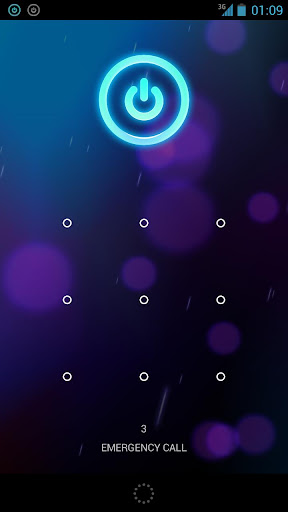
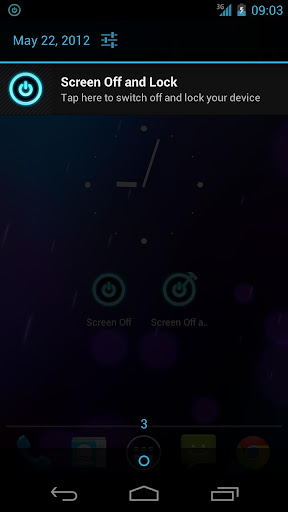
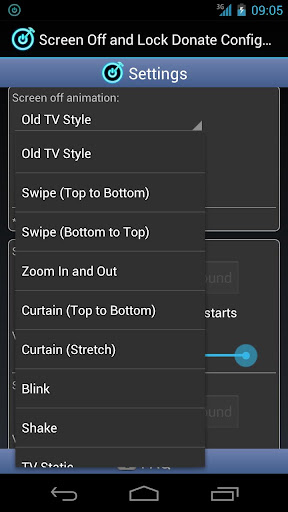
For those of you who want the screen off effect from Nexus series, but don't want to root your phone, i have found a small but great app, that can do just that, plus it has like 10 screen off effects and you can also use sound effects for lock / unlock screen.

You can put the shortcut on your home screen or even in the main dock for fast access, this way you can lock & close your screen in just a flash. Also, you can make a shortcut on your Lock Screen and you got all your phone covered.

Give it a try, here it is:

Screen Off and Lock (Donate) v1.14 - mirror

If you like this app, be sure to Rate it in the Market and buy / donate to support the developer. Google Play

Update: Currently working properly Samsung Galaxy S3 GT-i9300.

Some pics: 


Saturday, May 7, 2011

DVD Cover - Exact Size in Photoshop - How to print

If u'r trying to make and print a dvd cover with special programs or plain windows soft you will soon realize that is not so simple to get it done.

I have tried several size and pixels / dpi settings, until i finally got the exact size for a perfect DVD Case cover, but i only got it to work doing the following 5 easy steps:

1. Open the image you want to use for cover in Photoshop (it's recommended to be a large size pic)

2. Resize it to 277mm(10,9") x 182mm(7,17") x 300 DPI

3. Save it as a .jpg file, let's say "testCS5.jpg" (select the max size, also the best)

If u try to print it now, the resulting cover will be oversized and you'll have to cut into the picture for it to fit the dvd case, so follow the next steps:

4. Convert "testCS5.jpg" to PDF, using any converter out there, i prefer Nitro PDF, it has a intuitive user interface and it also mounts a virtual printer for perfect converting of pictures / documents.

5. Print it: open the resulting "testCS5.pdf" in any pdf reader, Nitro or Adobe Reader and print it, you don't have to change any settings, just remember to select "Page Scaling: None", because it's already the exact size.

Some useful info:

DVD Cover size - 277mm(10,9") x 182mm(7,17") (front+spine+back)

Front / Back - 132mm(5,2") x 182mm(7,17")

Spine - 12mm(o,5") x 182mm(7,17")

Saturday, April 30, 2011

ESET Mobile Security for Android Beta

Eset finally released the mobile version of its well known antivirus software, compatible with all Android powered devices. It has a lot of cool features, like Remote Lock, GPS Localization, Remote Wipe and my favorite Call intercept, you can use this last one to block any incoming or outgoing calls.
Runs on any Android 2.0+ platform and the minimum requirements are: 600Mhz CPU, 256MB Ram and 5MB of internal storage space.

Have fun testing this Beta release, get your free version from here.

Thursday, April 28, 2011

Root your Android phone with SuperOneClick root tool


Another great piece of software provided by the guys over at xda. All you have to do is follow a few easy steps and you're good to go. Please keep in mind that rooting your phone will permanently void the warranty and could possibly turn your phone into a nice looking piece of platic, but those are very rare cases, anyway you should proceed with care. Also, make sure you have read the documentation available all over the net for better understanding the root process and the terms of root, kernel, rom, firmware, etc...

Let's begin:
1. Download the software from the developer's webpage.
2. Activate the USB Debugging mode (Menu > Settings > Applications > Development >check USB Debugging Mode)
3. Install the drivers for your phone (most times those are installed automatically when you first connect your phone to the pc)
4. Connect your phone to pc and press Root.

You're done!

Samsung Galaxy S II Original Live Walpapers

Some smart guys were able to extract those beautiful live wallpapers from the Galaxy S II system dump, all you have to do is install them on your Android device just like any other app.
Those live wallpapers, named Beach and Windmill have the ability to display live weather conditions directly on your background. The animations will change according with the current weather, if it rains outside, the wallpapers will display live rain drops, if it snows, the screen will freeze along with some snow flurries. They're just great, try them!

Download them from: here - mirror

Top 5 Android Apps - April 2011

These are the top 5 apps that i have installed & tested this month.

1. mVideoPlayer - This has to be the best replacement for any stock video player. It has a very intuitive UI, its able to play all video file types that are supported by your phone and the most important fact, it also has subtitle support with size, color, placement and font settings. You can get the free version from the Android Market or you can download the Pro 2.8.2 version from here. Be sure to donate / buy this app if you like it!

2.  GPS Test Plus - A very useful tool for testing your gps signal and all the information provided by the satellites, like your exact position (within a few meters), speed, altitude, etc... It also shows you the number of satellites that are "In view" and "In use". You can get the free version from the Android Market or you can download the Plus 1.1.3 version from here. Be sure to donate / buy this app if you like it!

3. Tapatalk Forum App - This application allows you to access all the vB, phpBB, IPB, SMF forums that  have the Tapatalk plugin activated. It beats hands down any mobile browser, you will view all your forums in a very attractive way, you'll also be able to edit / moderate them. It has no free version, you can buy it from the Android Market or you can download v1.11.6 from here. Be sure to donate / buy this app if you like it!

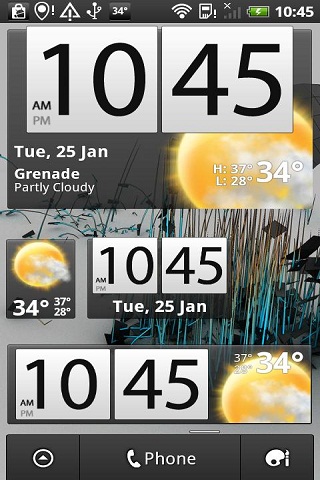
4. Beautiful Widgets - A set of widgets that run on any Android device, it includes clocks widgets, weather widgets, date widgets and toggle widgets with skins/themes support. The weather clock widget can be skined to look exactly like the stock one from the HTC devices. It has no free version, you can buy it from the Android Market or you can download v3.52 from here. Be sure to donate / buy this app if you like it!
Bonus: If you can't download skins from within the app, get them from here.

5. Advanced Task Killer - The best tool for killing applications that run in the background and lower your phone performance, it will also save some battery life. Please read the app documentation before using it, the Android OS is meant to run smoothly with some apps running all the time, do not over kill them, you could damage your system stability. You can get the free version from the Android Market or you can download the Pro 1.9.6B73 from here. Be sure to donate / buy this app if you like it!